


Payment method deposit limits
What are deposit limits?
Deposit limits control how much you can deposit into your account over a set period.
They help you manage spending and may come from two sources:
- Self-imposed limits (set by you)
- Payment method limits (set by the system)
Payment method limits
These limits:
- Apply to each payment method
- May vary based on account activity, history, and other factors
Deposit limits in Spain (.ES)
If you are using the .ES platform, deposit limit rules may differ due to local regulations.
See:
Deposit limits on the PokerStars ,ES platform.
Where can I see my deposit limits?
To view your limits:
- Go to the 'Cashier'.
- Select 'Deposit'.
Your current limit appears in the bottom-right section of the screen.
If multiple limits apply:
- Only the lowest (most restrictive) limit is shown
- This is the limit that will be reached first
What happens if I reach my deposit limit?
If you reach your limit:
- Your deposit may be restricted or blocked.
- You will receive a notification.
- You may still be able to use another payment method.
For more details, see: Deposit limit scenarios
Deposit limit scenarios
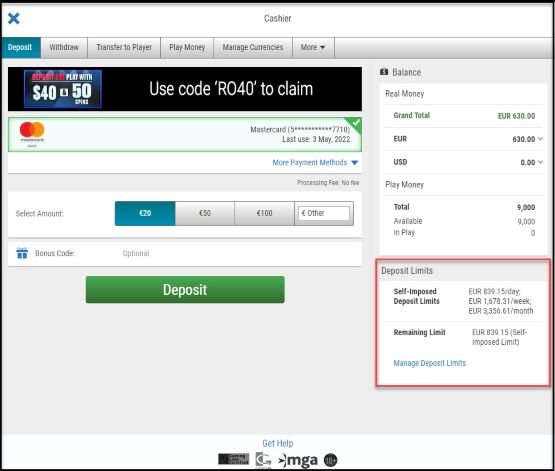
You have approved self-imposed deposit limits in place
The feature will show:
Self-imposed deposit limit
Shows your approved deposit limits.
Pending limit changes are not displayed.
The currency shown is based on your preferred currency.
Remaining limit
Shows how much you can still deposit before reaching your next applicable limit.
Manage Deposit Limits
Use this option to update your self-imposed deposit limits.
You can also access this feature via:
Tools → Responsible Gaming → Restrict Deposit Limit
Screenshot showing in red where the 'Manage Deposit Limits' box is displayed
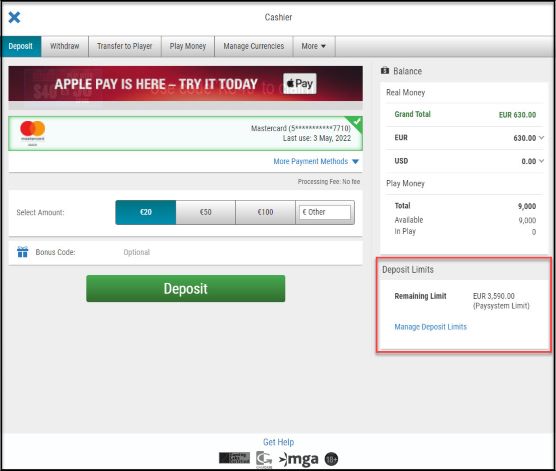
You didn't set up any self-imposed deposit limits
The feature will show:
Remaining limit
Shows how much you can still deposit before reaching your next applicable limit.
The currency displayed is based on your preferred currency.
Manage Deposit Limits
Use this option to set or update your self-imposed deposit limits.
You can also access this feature via:
Tools → Responsible Gaming → Restrict Deposit Limit
Screenshot showing in red where the Deposit Limits are displayed
Did you find this article useful?
Related Articles
- Know Your Customer verification process
- How to check the payment methods I can use for deposits and withdrawals?
- Table and tournament limits
- Deposit limits
- How to make a deposit
- Requesting playing history audit
- How do I get free Play Money chips?
- Why do I see unauthorized or duplicate card charges on PokerStars?
- Deposit with a card
- How do I use Interac for deposits and withdrawals?